> ## Documentation Index
> Fetch the complete documentation index at: https://docs.eigenexplorer.com/llms.txt
> Use this file to discover all available pages before exploring further.
# Get Started
> Learn how to retrieve your first API data
Starting January 6th, 2025, API key authentication will be required. We are
currently transitioning to mandatory API key usage.
To begin using the EigenExplorer API, please follow these detailed steps below. This guide will help you set up authentication and make your first API request.
Your first step is to obtain an API key from the EigenExplorer Developer Dashboard.
Begin by visiting the [EigenExplorer Developer Dashboard](https://developer.eigenexplorer.com) and logging into your account.
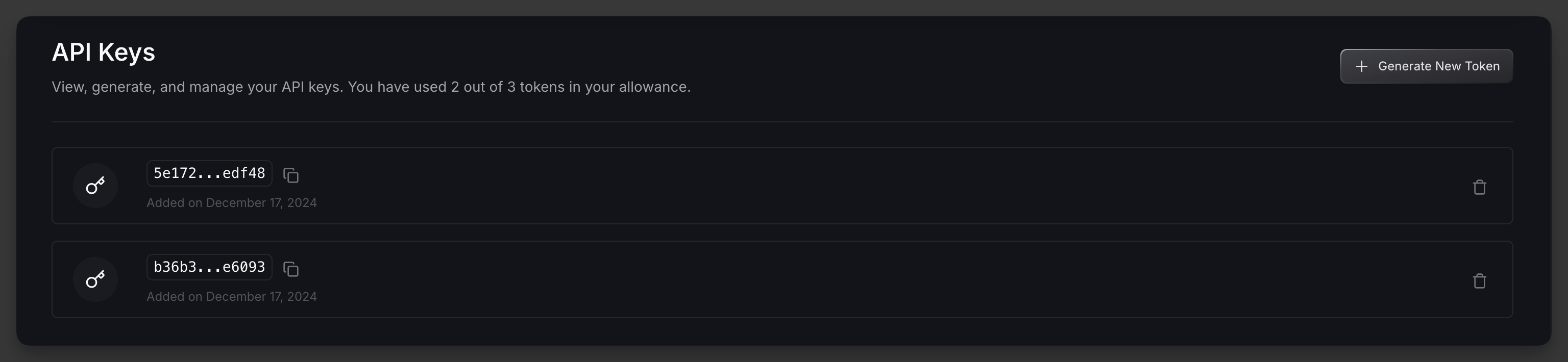 Once you're logged in, you'll be able to generate your first API key.
Store your API key securely. Never share it or commit it to version control.
After obtaining your API key, you'll need to select the appropriate base URL for your needs. The base URL you use will depend on which network you want to interact with:
* For accessing the Ethereum Mainnet, please use: `https://api.eigenexplorer.com`
* For accessing the Holesky Testnet, please use: `https://api-holesky.eigenexplorer.com`
For example, if you want to retrieve all AVS deployments on the Ethereum Mainnet, you would use the following endpoint: `https://api.eigenexplorer.com/avs`
For more information, please visit [here](./mainnet-and-holesky-api).
To authenticate your requests, you'll need to include your API key in the header of each request.
Add an `x-api-token` header to your requests, with the value being your API key.
Here're a few examples using cURL, JavaScript, and Python:
```bash cURL theme={null}
# Set your API key
API_KEY="your_api_key_here"
# Make a request to get all AVS
curl -X GET "https://api.eigenexplorer.com/avs" \
-H "x-api-token: $API_KEY" \
-H "Content-Type: application/json"
```
```python Python theme={null}
import requests
def get_all_avs():
API_KEY = 'your_api_key_here'
BASE_URL = 'https://api.eigenexplorer.com'
headers = {
'x-api-token': API_KEY,
'Content-Type': 'application/json'
}
try:
response = requests.get(f'{BASE_URL}/avs', headers=headers)
response.raise_for_status()
return response.json()
except requests.exceptions.RequestException as e:
print(f'Error fetching AVS: {e}')
raise
```
```javascript JavaScript theme={null}
async function getAllAvs() {
const API_KEY = 'your_api_key_here';
const BASE_URL = 'https://api.eigenexplorer.com';
try {
const response = await fetch(`${BASE_URL}/avs`, {
headers: {
'x-api-token': API_KEY,
'Content-Type': 'application/json'
}
});
if (!response.ok) {
throw new Error(`HTTP error! status: ${response.status}`);
}
const data = await response.json();
return data;
} catch (error) {
console.error('Error fetching AVS:', error);
throw error;
}
}
```
After completing your initial setup, you are good to go!
Feel free to poke around the available API endpoints or learn about the [rate limits](/api-reference/rate-limit) to ensure optimal API usage.
Once you're logged in, you'll be able to generate your first API key.
Store your API key securely. Never share it or commit it to version control.
After obtaining your API key, you'll need to select the appropriate base URL for your needs. The base URL you use will depend on which network you want to interact with:
* For accessing the Ethereum Mainnet, please use: `https://api.eigenexplorer.com`
* For accessing the Holesky Testnet, please use: `https://api-holesky.eigenexplorer.com`
For example, if you want to retrieve all AVS deployments on the Ethereum Mainnet, you would use the following endpoint: `https://api.eigenexplorer.com/avs`
For more information, please visit [here](./mainnet-and-holesky-api).
To authenticate your requests, you'll need to include your API key in the header of each request.
Add an `x-api-token` header to your requests, with the value being your API key.
Here're a few examples using cURL, JavaScript, and Python:
```bash cURL theme={null}
# Set your API key
API_KEY="your_api_key_here"
# Make a request to get all AVS
curl -X GET "https://api.eigenexplorer.com/avs" \
-H "x-api-token: $API_KEY" \
-H "Content-Type: application/json"
```
```python Python theme={null}
import requests
def get_all_avs():
API_KEY = 'your_api_key_here'
BASE_URL = 'https://api.eigenexplorer.com'
headers = {
'x-api-token': API_KEY,
'Content-Type': 'application/json'
}
try:
response = requests.get(f'{BASE_URL}/avs', headers=headers)
response.raise_for_status()
return response.json()
except requests.exceptions.RequestException as e:
print(f'Error fetching AVS: {e}')
raise
```
```javascript JavaScript theme={null}
async function getAllAvs() {
const API_KEY = 'your_api_key_here';
const BASE_URL = 'https://api.eigenexplorer.com';
try {
const response = await fetch(`${BASE_URL}/avs`, {
headers: {
'x-api-token': API_KEY,
'Content-Type': 'application/json'
}
});
if (!response.ok) {
throw new Error(`HTTP error! status: ${response.status}`);
}
const data = await response.json();
return data;
} catch (error) {
console.error('Error fetching AVS:', error);
throw error;
}
}
```
After completing your initial setup, you are good to go!
Feel free to poke around the available API endpoints or learn about the [rate limits](/api-reference/rate-limit) to ensure optimal API usage.